background

Have you ever noticed that certain words on the Web look a little bit different? Whenever you see a word or phrase that’s underlined in blue, it’s probably a hyperlink, or link for short.


What is Hyperlinks ?


"link" was coined in 1965, Ted Nelson

A hyperlink, also called a link or web link, contains an address for a destination and acts as a reference to data. A user can easily follow, jump to, and be directed to the destination by either clicking, tapping on, or hovering over the link.


To understand what links are, let’s go back to the very basics of Web architecture.

Arrow

In 1989, Tim Berners-Lee, the Web's inventor
spoke of the three pillars on which the Web stands

HomeURL

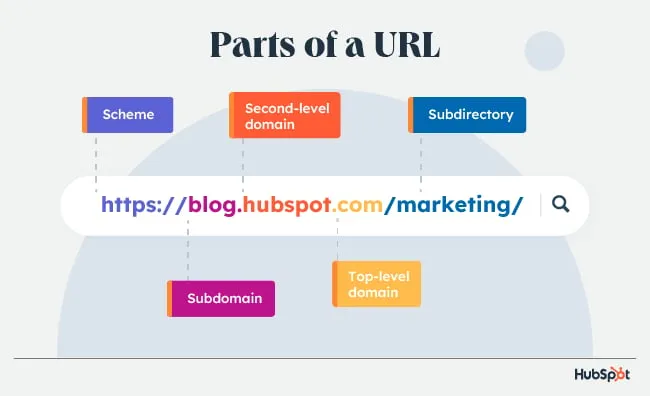
URL

A URL is nothing more than the address of a given unique resource on the Web.

In theory, each valid URL points to a unique resource. Such resources can be an HTML page, a CSS document, an image, etc. In practice, there are some exceptions, the most common being a URL pointing to a resource that no longer exists or that has moved. As the resource represented by the URL and the URL itself are handled by the Web server, it is up to the owner of the web server to carefully manage that resource and its associated URL.
Read more about this is some title
HTML

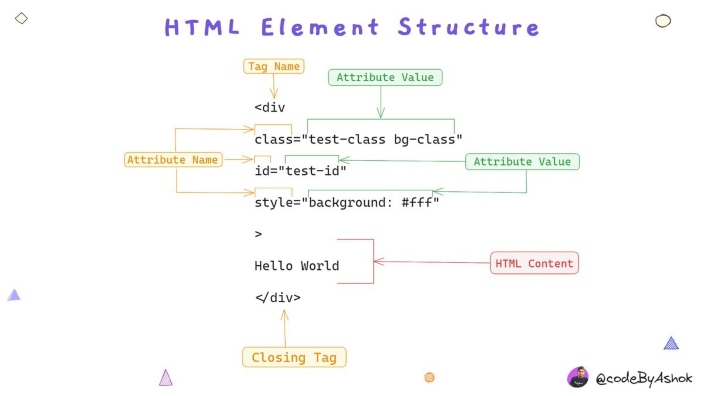
HTML is the code that is used to structure a web page and its content.

For example, content could be structured within a set of paragraphs, a list of bulleted points, or using images and data tables. As the title suggests, this article will give you a basic understanding of HTML and its functions.
Read more about this is some title
h1http

HTTP

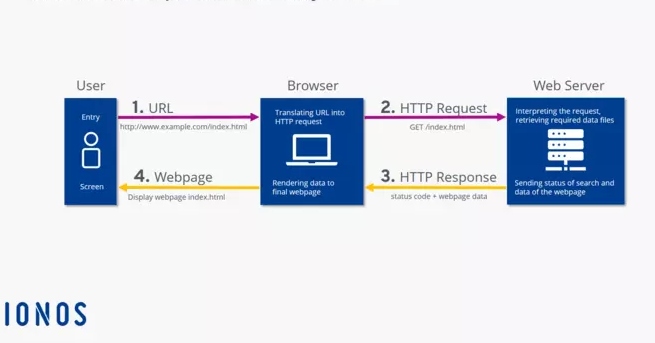
The Hypertext Transfer Protocol (HTTP) is an application layer protocol in the Internet protocol suite model for distributed, collaborative, hypermedia information systems.

HTTP is the foundation of data communication for the World Wide Web, where hypertext documents include hyperlinks to other resources that the user can easily access, for example by a mouse click or by tapping the screen in a web browser.
Read more about this is some title

As you can see in the three pillars, everything on the Web revolves around documents and how to access them.

The Web’s original purpose was to provide an easy way to reach, read, and navigate through text documents. Since then, the Web has evolved to provide access to images, videos, and binary data, but these improvements have hardly changed the three pillars. Before the Web, it was quite hard to access documents and move from one to another. Being human-readable, URLs already made things easier, but it’s hard to type a long URL whenever you want to access a document. This is where hyperlinks revolutionized everything. Links can correlate any text string with a URL, such that the user can instantly reach the target document by activating the link.

How to implement hyperlinks?
Two important components!

01

Anchor Tag

Anchor tags in HTML code are HTML elements used to create hyperlinks in webpages.

They allow you to link to another webpage, a specific section of a page, an email address, a file, or any other URL. They are also known as anchor elements or <a> tags.
The <a> HTML element (or anchor element), with its href attribute, creates a hyperlink to web pages, files, email addresses, locations in the same page, or anything else a URL can address. Content within each <a> should indicate the link’s destination. If the href attribute is present, pressing the enter key while focused on the <a> element will activate it.
Anchor links (or “jump” links) link to different sections of the same webpage. When you create text links with the “a” tag, you’ ll need to use some kind of anchor text. Google uses this text to learn more about the link and the content it points to.
Href The “href,” short for hypertext reference, attribute specifies the target for the anchor element. It’s commonly used to define the URL of the page the tag links to. But you can also use it to link to files, email addresses, phone numbers, and more. The href anchor tag is the URL between quotation marks.

02

XMLHttpRequest

XMLHttpRequest (XHR) objects are used to interact with servers.

XMLHttpRequest (XHR) is a JavaScript object API used to transmit HTTP requests from a web browser to a web server. These methods enable fine-grained server calls for browser-based applications, storing the results in the responseText attribute of XMLHttpRequest. XMLHttpRequest is a component of Ajax programming. Before Ajax, hyperlinks and form submissions were the primary mechanisms for interacting with servers, often resulting in page replacements.
With XMLHttpRequest, you can retrieve data from a URL without requiring a full page refresh. This allows web pages to update specific sections without disrupting user activities.

The XMLHttpRequest object is a developer’s dream because it allows you to:
* Update a web page without reloading the page
* Request data from a server - after the page has loaded
* Receive data from a server - after the page has loaded
* Send data to a server - in the background

How to create a hyperlink on your webpage

Depending on the web content management system you use, the location and appearance of your tools may vary. In general, the tool for hyperlinking text will look like a chain link. Sometimes the tools for “add an attachment” and “hyperlink text” can look similar, so you may have to test to be certain you have the right one.

* The hyperlink tool will expect two inputs: your anchor text (sometimes called “target text” or similar) and the full URL or web address of the link.
* If you highlight your anchor text before clicking on the link tool, most interfaces will automatically populate your highlighted text as the anchor text.
* Open the URL you want to link in a browser, copy the URL, and paste it into the hyperlink tool.
* Save the change, and the text in your paragraph will appear as colored, underlined text.
* Save the page to save your new link. You can test it by clicking on the anchor text.